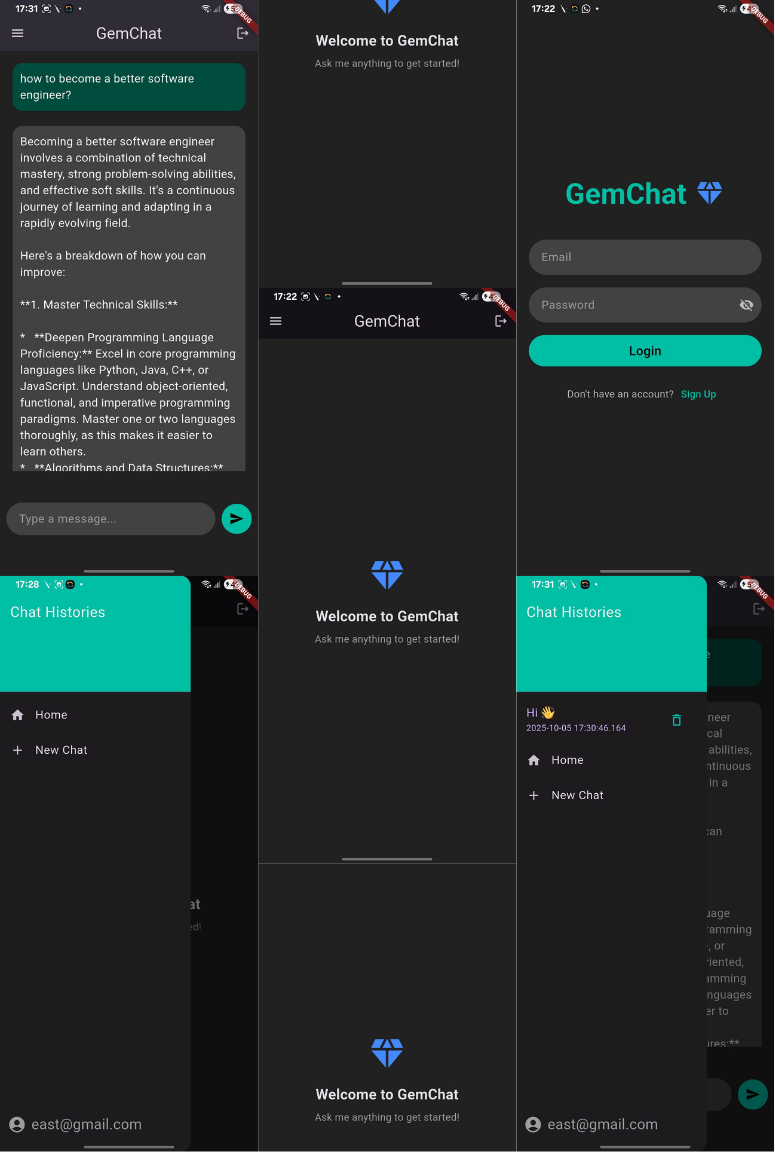
GemChat 💎
My Gemini-Powered AI Chat App with Flutter, Firebase & BLoC

GemChat 💎 is a simple yet powerful AI chatbot I built using Flutter, Firebase, and Google’s Gemini API.
The target was — create a clean, real-time chat experience where every conversation feels fluid, intelligent, and personal.
This article shares how I built GemChat from scratch — from user authentication and conversation storage to AI response handling using the BLoC architecture.
🧑💻 Source code
💡 Motivation behind GemChat?
I wanted to combine three things:
The intelligence of Gemini (2.5 flash)
The reliability of Firebase for managing users & data
The structure of BLoC for scalable state management
GemChat merges them into a unified, elegant experience — fast, modular, and easy to extend.
Key Features
✅ Email + Password Authentication
✅ Multiple Chat Sessions (via Drawer)
✅ Auto Scroll to Latest Message
✅ Retry on Timeout / Error
✅ Offline Check Before Sending Prompt
✅ Persistent Chat History in Firestore
✅ Simple, Beautiful Dark UI
🔍 Firestore Structure
users/
  userId/
    chats/
      chatId/
        conversations: [
          { prompt: "Hello!", response: "Hi there 👋" },
          { prompt: "What can you do?", response: "I can assist with many things..." }
        ]
        lastUpdated: <timestamp>
Each user can have multiple chat histories, each stored as a list of prompt-response pairs.
🧠 App Architecture
Firebase Auth
     ↓
Firestore
     ↓
ChatBloc (Handles events + states)
     ↓
ChatRepo (Dio + Gemini API calls)
     ↓
UI (BlocConsumer + StreamBuilder)
Challenges
Handling timeouts gracefully
Ensuring auto-scroll after rebuilds
Maintaining sync between Firebase and BLoC states
Designing Firestore schema for scalability
Lessons Learned
Using BLoC for separating UI logic pays off massively.
Firestore’s arrayUnion is perfect for storing structured chat histories.
Gemini’s response format requires careful decoding and error handling with Dio.
🌱 Future Enhancements
🎙️ Voice input + speech output
🧩 Markdown & rich text support
🪄 Prompt templates (e.g., summarize text, explain code)
🧠 Gemini 2.5 flash LLM integration for multimodal input
Acknowledgements
Educational resource
Development tools
- ChatGPT - AI assistance for resolving specific styling and structural challenges
📽️ Screen recording
Screenshots